"Best Free and Open-Source GIS Software Alternatives to ArcGIS"
Spatial analysis, mapping, and data representation depend on Geographic Information System (GIS) software. Although ArcGIS by Esri is a powerful and widely used GIS platform, many users try free and opensource alternatives since the licensing expenses are prohibitive. Several sophisticated opensource GIS tools fortunately are available free of cost.
The top free GIS software substitutes to ArcGIS, their features, benefits and drawbacks, as well as applications, are discussed in this tutorial.
 |
Infographic comparing ArcGIS with QGIS and other alternatives, highlighting key features, pros, and differences in functionality. |
1. QGIS (Quantum GIS)
QGIS is one of the most popular open-source GIS software, providing a user-friendly interface with powerful mapping and spatial analysis tools.
Key Features:
Supports vector, raster, and database formats.
Extensive plugin ecosystem for custom GIS workflows.
Advanced cartographic styling and map printing.
Python scripting (PyQGIS) for automation and custom tools.
Compatible with PostGIS, GRASS GIS, and GDAL.
🔗 Download QGIS: https://qgis.org
 |
QGIS interface displaying a map with multiple layers, showcasing the various data layers and tools available for spatial analysis. |
2. GRASS GIS (Geographic Resources Analysis Support System)
GRASS GIS is a powerful GIS tool with advanced geospatial modeling and remote sensing capabilities.
Key Features:
Over 350+ GIS modules for spatial analysis.
Raster and vector data processing.
Supports 3D visualization and time-series analysis.
Command-line scripting for batch processing.
Integration with QGIS for enhanced usability.
🔗 Download GRASS GIS: https://grass.osgeo.org
 |
GRASS GIS interface processing raster data, displaying tools and options for spatial analysis and data manipulation. |
3. Google Earth Engine (GEE)
Google Earth Engine (GEE) is a cloud-based platform for large-scale geospatial data processing and remote sensing.
Key Features:
Access to petabytes of satellite imagery.
Built-in machine learning and AI capabilities.
Supports Python and JavaScript APIs.
No need for local processing power.
Ideal for environmental monitoring and climate change research.
🔗 Start Using Google Earth Engine: https://earthengine.google.com
 |
Google Earth Engine interface showing satellite imagery, with tools for analyzing and processing geographic data over time. |
4. Whitebox GAT
Whitebox GAT is a lightweight yet powerful open-source GIS for hydrological and terrain analysis.
Key Features:
Advanced LIDAR and DEM processing.
Tools for hydrological modeling and landscape analysis.
Supports Python scripting.
Fast and efficient geospatial computations.
🔗 Download Whitebox GAT: https://whiteboxgeospatial.com
 |
Whitebox GAT interface displaying terrain analysis, with tools for processing elevation data and generating topographic maps. |
5. gvSIG
gvSIG is a Java-based GIS designed for spatial data visualization and analysis.
Key Features:
Multi-platform compatibility (Windows, Linux, macOS).
3D visualization tools.
Extensive support for OGC standards (WMS, WFS, WCS).
Available in multiple languages.
🔗 Download gvSIG: https://www.gvsig.com
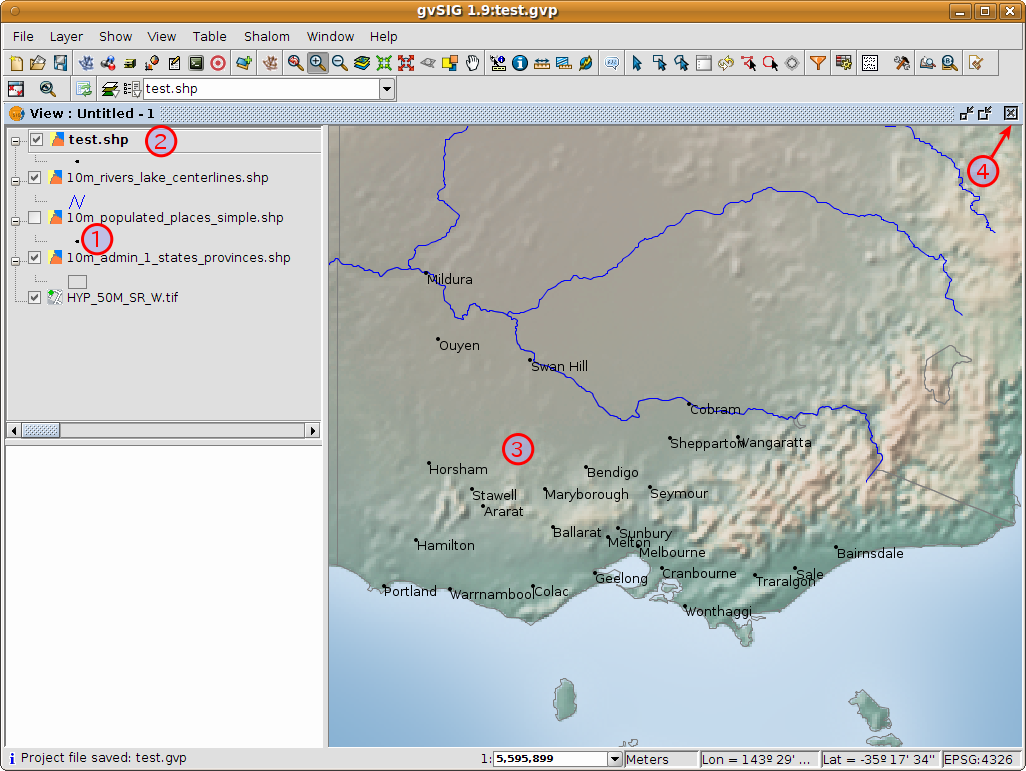 |
gvSIG interface showing vector analysis, with tools for working with vector data layers and performing spatial analysis tasks. |
6. MapWindow GIS
MapWindow GIS is a simple yet effective open-source GIS software, ideal for basic spatial analysis.
Key Features:
Easy-to-use interface for beginners.
Supports shapefiles, raster data, and geodatabases.
Extensible with plugins and .NET development.
Focuses on hydrological modeling and land-use planning.
🔗 Download MapWindow GIS: https://www.mapwindow.org
 |
MapWindow GIS interface displaying a simple map, with basic mapping tools for visualizing and analyzing geographic data. |
7. OpenJUMP GIS
OpenJUMP is a Java-based GIS software designed for vector-based analysis and editing.
Key Features:
Simple vector-based spatial analysis tools.
Compatible with PostGIS and geodatabases.
Supports custom plugins and scripting.
🔗 Download OpenJUMP: https://www.openjump.org
 |
OpenJUMP GIS interface showcasing a map with various spatial data layers and tools for data visualization and analysis. |
8. SAGA GIS (System for Automated Geoscientific Analyses)
SAGA GIS is a powerful geospatial analysis tool specializing in terrain, hydrology, and climate analysis.
Key Features:
Advanced spatial modeling capabilities.
Supports raster, vector, and tabular data.
High-performance geoprocessing tools.
🔗 Download SAGA GIS: http://www.saga-gis.org
 |
SAGA GIS interface displaying geospatial analysis tools, with options for processing and analyzing raster and vector data. |
Conclusion: Which GIS Software Should You Choose?
If you're looking for the best ArcGIS alternative, consider the following:
QGIS – Best all-in-one alternative with powerful plugins.
GRASS GIS – Ideal for remote sensing and terrain modeling.
Google Earth Engine – Best for large-scale satellite analysis.
Whitebox GAT – Perfect for hydrology and LIDAR analysis.
SAGA GIS – Great for terrain and climate analysis.
Comments
Post a Comment